ss

Please enable / Bitte aktiviere JavaScript!
Veuillez activer / Por favor activa el Javascript![ ? ]
‏إظهار الرسائل ذات التسميات Utility. إظهار كافة الرسائل

الجمعة، 15 يونيو 2012

Internet Download Manager Full


Internet Download Manager (IDM) 6.09 Build 3 - As You already know that IDM is a powerful tool that enable to increase Your download speed multiple times than it's a manually download. Then recently IDM has updated to the newest version of IDM which is to the latest version is IDM 6.09 build 3. IDM is the best tool You can use for downloading any files, in any format like: Youtube video, audio (mp3/mp4), documents, etc with a great speed of downloading.


Internet Download Manager has the ability to recover network problem while You're downloading any files, so that You can resume the downloading process. IDM is supports with all browsers, such as: Firefox, chrome, Internet exploler, Opera, Netscape, etc.

Features of IDM 6.09 build 3:

- Has improved to increasing the download process for any filr sharing websites
- Compatible with the the latest version of mozilla Firefox 11, and 12, so You won't get to such a worry because it's already support.
- To fixed any bugs that may come up while You're downloading any file.

IDM 6.09 build 3 supports for all Windows (XP/Vista/7/32 bit, 7/64bit), with multiple languages, this software is shareware has added on Feb 26 2012

Download IDM 6.09 build 3 | from Filehippo 4.27 MB

Okdo Document Converter Professional


Okdo Document Converter Professional 4.3 - In earlier post I have posted the software to convert from PDF to Word Doc, and scanned doc to word converter. And now, I share with you another converter software Okdo Document Converter Professional which is an easy-to-use application helps you to convert between various multimedia formats. Okdo Document Converter Professional 4.3 upports so many files format, you can convert Word Doc, MS Excel, MS Power Point, Rich Text, Adobe Crobat Doc (PDFSHock), Text, Doc (txt), HTML Doc (HTML), Shockwave flash Object (swf), JPG, PNG, BMP, GIF, Windows Icon, and more. 


Features Okdo Document Converter Professional:

Batch convert any format at once that supports: doc, docx, docm, xls, xlsx, xlsm, ppt, pptx, pptm, pdf, rtf, txt, htm, html, url, jpg, jpeg, bmp, gif, tif, wmf, emf, png, jp2, j2k, pcx, rle, tga, ico, swf video etc.

Extract PDF text
Output PDF pages as images
Convert PowerPoint to Word/Excel
Can convert each page of a Word/ Rtf to single file.
Can merge Excel sheets.
Can automatically adjust the sheet page size of Excel
Custom page margin.
Can convert to SWF video
Use Flash6 format to compress your videos
Automatically adjust image size as SWF size.
Can merge multi-URL snapshot images to one PowerPoint file.
Can convert Txt file to a multipaged ppt/ tif
Can adjust the PowerPoint slide size and direction.


Key Features:

User-friendly interface.
Support add the entire folder to convert.
Extract the characters of PDF file to convert.
Convert PDF to Word,Excel,PowerPoint,Text,Jpeg,Tiff,Gif,icon,pcx and so on with accurately preserving the original Text,Tables,Graphics and Layout.
Save List: Save the converted files to a list
Load List: Load the saved list files directly to convert.
Precise control the output quality with user-defined parameters settings.
Support convert Docx,Docm,Xlsx,Xlsm,Pptx,Pptm of office 2007.
Support Win98/ME/NT/2000/XP/2003/Vista (x64)/Windows 7 platforms.

Download Okdo Document Converter Professional 4.3 Full + Serial Number. Link download MediaFire.

Download | Size 9.28MB
Password rar: www.bloggerclick.com
*Tested (Windows7)

الخميس، 14 يونيو 2012

Extract Images and Text From PDF File With Nitro PDF Reader

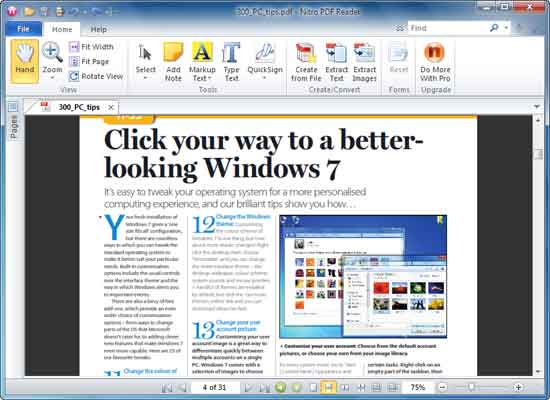
As you all know, PDF (portable document format) is definitely the most popular, non-editable document distribution format, which have text and images. You can open it on nearly any operating system, in exactly the same format by using a PDF reader, for example Adobe Reader. If you are looking a way to extract text (for editing) or images from a PDF file, here is how you can do all that with Nitro PDF Reader.


Unlike other popular PDF readers, Nitro PDF Reader offers a host of outstanding features like ability to extract text and image only from PDF documents, creates new PDF file, fill and save forms, addtext to pages, stamp your signature, etc. It has an intuitive Microsoft Office 2010 ‘Ribbon’ type interface and has a faster start time.


How to Extract Text and Images From a PDF Document
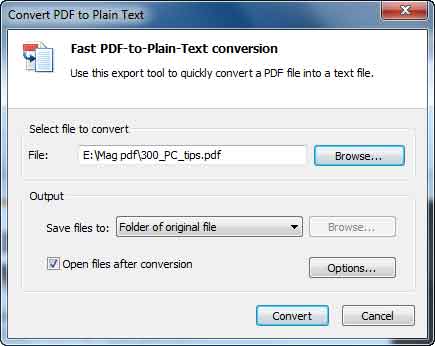
To extract text from a PDF document (or to convert PDF file into plain text), just open a PDF file in Nitro PDF Reader and click ‘Extract Text’ button, choose a location to save file and click ‘Convert’ button. The process is really fast and amazing.


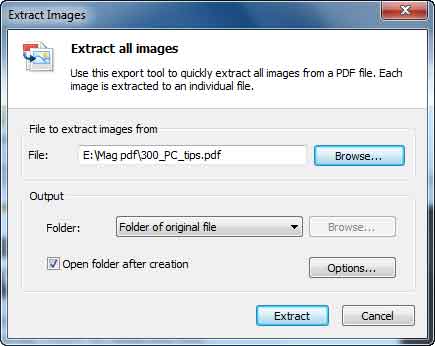
Similarly, to extract only images from a PDF file, click ‘Extract Images’ button, choose file save location and click ‘Convert’ button. It will extract each image into an individual file and saves.


Nitro PDF Reader is a freeware and can be downloaded (26MB) at source. It supports Windows XP, Vista and 7.

Windows 8 Task Manager Lets You Remove Unwanted Startup Programs

We have Windows 8 developer preview here for sometimes now and from my experience, I should say it is a fast, secure and user-centric OS. As we know, it brings new look and new features to ourcomputer. For example, the task manger in Windows 8 has a new look and added functionalities.

Now the task manger (press Ctrl + Alt + Del to enable) has two type of interface – one is simple that shows only running apps, which makes you easy to mange (terminate) a running app. Another is more detailed task manager (enable by clicking more details option) that gives comprehensive details (see screenshot above).

A new addition to the Windows 8 task manager is an option to control the start up items. Just click the Startup tab to see the programs running at Windows startup and its impact. Usually, too many items definitely will increase boot time.


From Startup tab, you can easily disable or block unwanted applications automatically launching at Windows startup. Then reboot your PC.

Add-on Recovery Tool For Firefox 7 to Recover Hidden Add-ons

Mozilla has released an add-on recovery tool for the recently released Firefox 7 for helping people who have missed their add-ons after upgrading their Firefox from the previous version. Though Mozilla is planning to release a small update (Firefox 7.0.1) to fix this bug, meantime you can use the official Add-on Recovery Tool to fix the issue.

Add-on Recovery Tool is a restartless add-on by Mozilla. Just install this add-on and restart your Firefox. All hidden add-ons will be visible and usable. Your tabs will also be restored and this tool will remove itself.


You can install Add-on Recovery Tool from here. More details available here.